 Non-traditional hiring, for hiring teams and job seekers
Not every role needs the fanciest CV. Hire for how people think.
Traditional hiring picks the most experience and the biggest names, and everyone fights over that same small pool. HireHelp AI measures what a CV can't: how a candidate thinks and the soft skills behind it, matched to what the role actually needs.
One method, two ways to use it
Pick your side. Both are free while we're in beta.
Shortlist the people who fit
- ✓Describe the role. We work out which of the eight intelligences it needs.
- ✓Share one application link. Applicants answer open questions about themselves, not their résumé.
- ✓Get applicants ranked by fit, with their soft skills backed by evidence from their own answers.
- ✓Go from 200 applications to the 20 worth a call. You interview and decide.
See what you could become
- ✓Build a profile with your experience, education and skills.
- ✓Answer questions about your life, one at a time, at least 80 words each.
- ✓See your intelligence spectrum and 894 careers placed by match.
- ✓Self reflect: a private chat about you, grounded in your own answers.
Where traditional hiring breaks
The most experience, the fanciest degree, the best company names: that's who the ATS lets through. It works, until your role isn't traditional.
Niche, one-off work
Training an AI model in a particular field, or a task no job title covers. No CV proves someone can do it, because almost nobody has done it yet.
Roles that run on soft skills
Sales, support, teaching, care. Resilience, honesty and reading people matter more than the hard skills on the résumé, and a résumé can't show them.
Freshers who all look alike
You need low-cost freshers, and every CV carries the same college names and the same projects. There is nothing to tell them apart.
On these roles, traditional metrics fail. You need non-traditional ones: verify the soft skills, and match each candidate's intelligence profile to the cognitive requirements of the job. As far as we know, we're the first to do this. Talent evaluated this way is non-traditional talent.
How hiring works
Three steps from job post to shortlist.
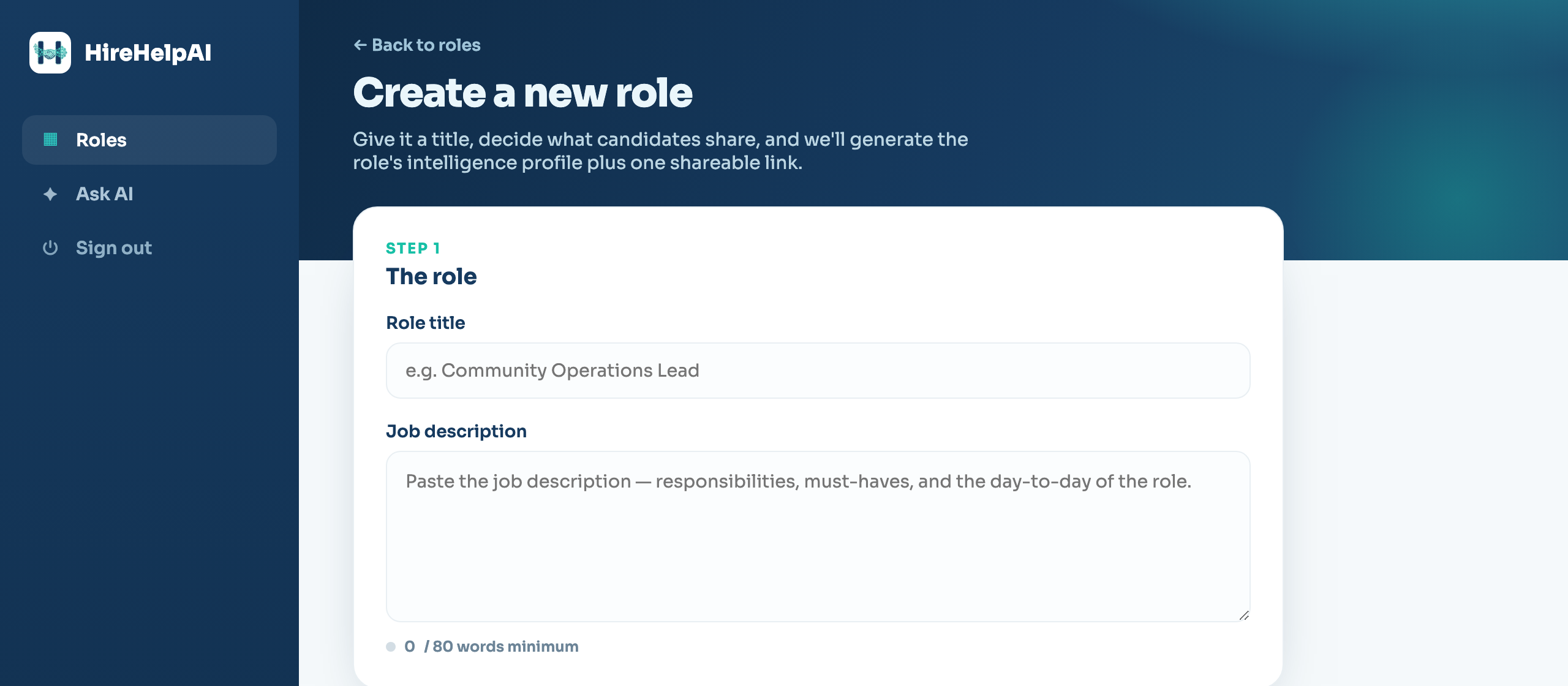
Describe the role
Paste the job description and add any fields you need: text, number, link or file upload. We work out the cognitive requirements of the role and give you one link to share.
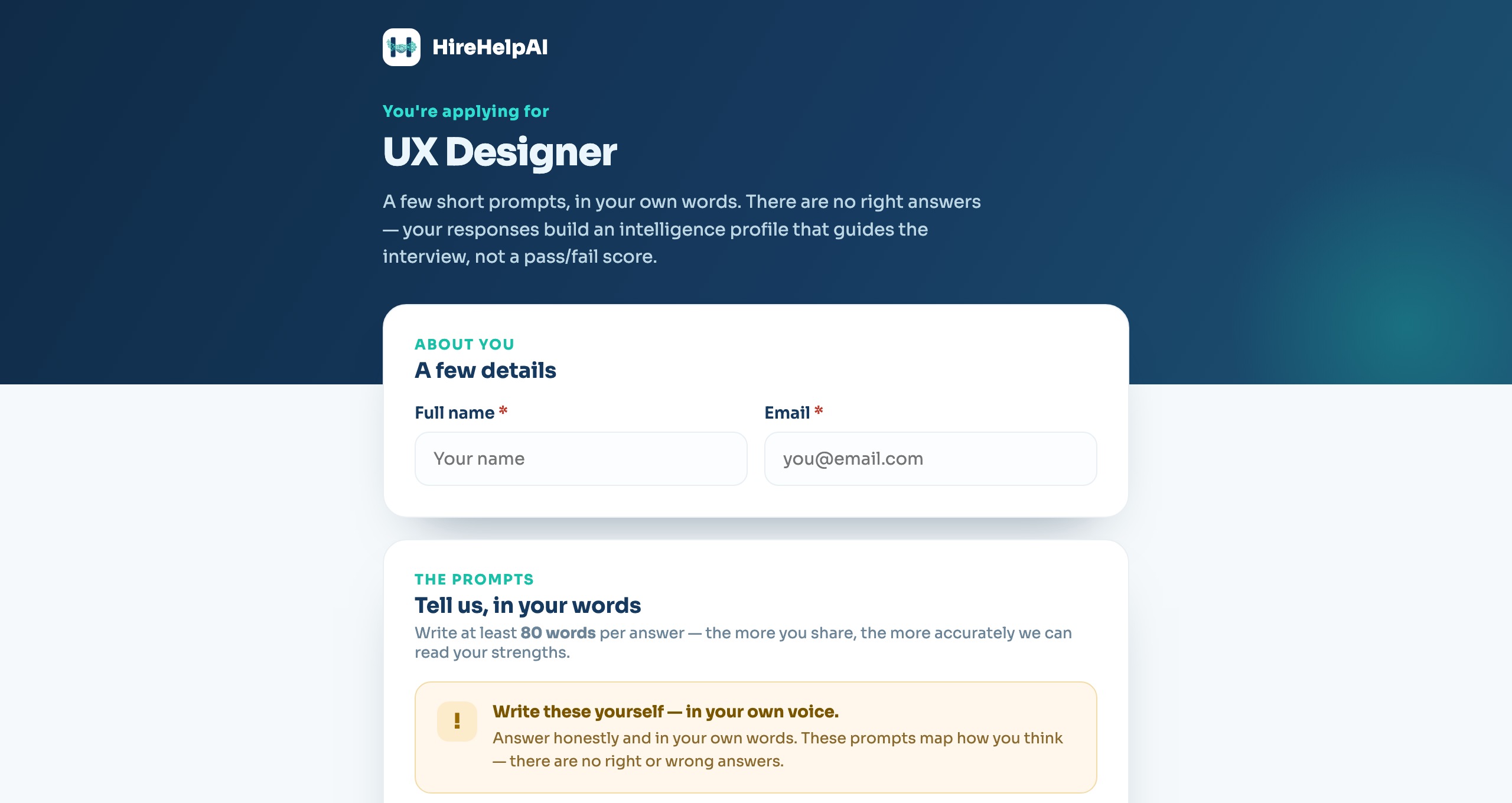
Share one link
Post it on LinkedIn or send it to applicants. They answer four open questions about themselves, in their own words.
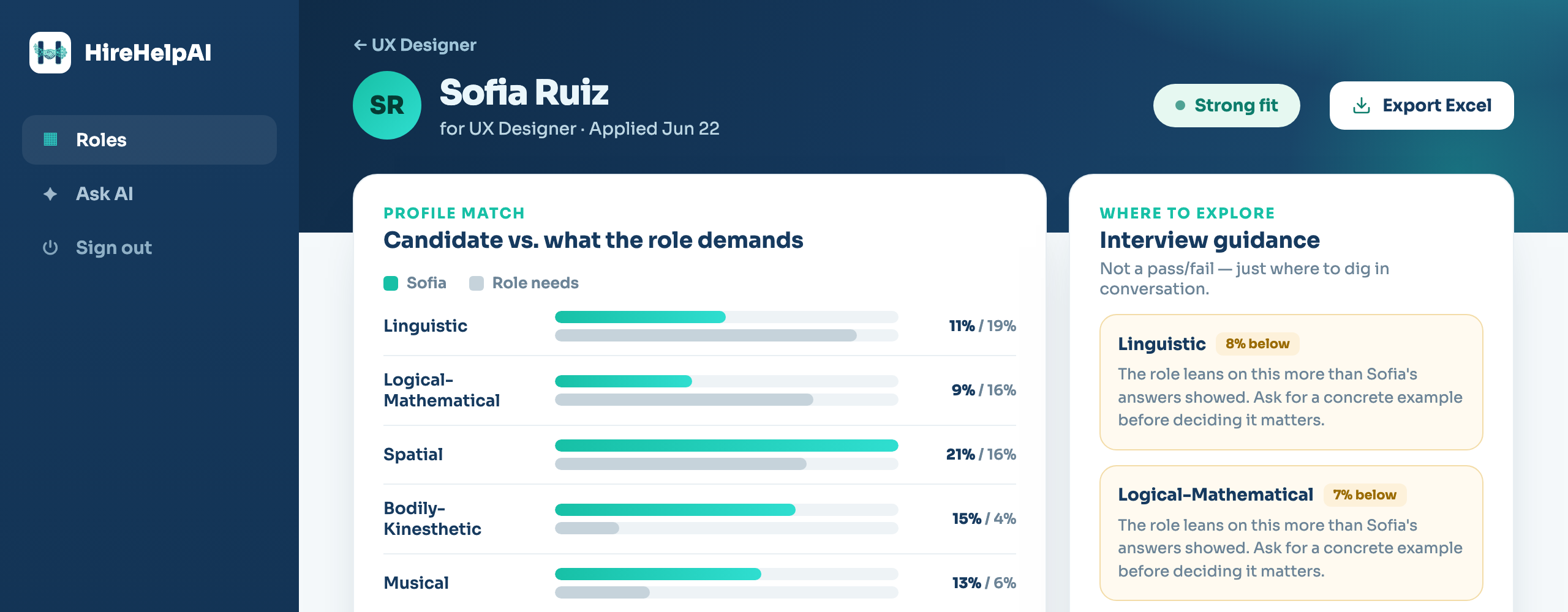
Get your shortlist
Every applicant comes back as an intelligence profile matched to the role and ranked by fit, with strengths, gaps, soft-skill evidence and what to ask in the interview.
Why we ask about your life, not your job
Howard Gardner's theory of multiple intelligences: everyone has eight intelligences in different amounts, shaped by their whole life. Work history is a small part of that, so we ask about the rest.
Life, not just work history
How you'd spend a free day. What you'd change as a minister. The biggest problem you've solved. Answers like these show how you think far better than a job title does.
Open answers, not ticked boxes
With four options or a rating scale, the "right" answer is easy to spot. Open questions with no right answer leave nothing to guess.
A spectrum, not a type
MBTI, DISC and similar tests put people in a box. You get a share on each of eight intelligences instead of a label.
Nothing to rehearse
People give polished, prepared answers to professional questions. Personal questions with no right answer get the real person, drawn from years of experience rather than today's mood.
For employers: the shortlist, with the evidence
HireHelp AI reads every application and shows its working, so you spend your time on the few who fit. You still make every call.
Turn any job description into a role profile
Paste the JD and HireHelp AI works out the cognitive requirements of the role: how it needs someone to think, before a single person applies.
- ✓Breaks every role down into eight intelligences, not vague keywords.
- ✓Built on Howard Gardner's theory of multiple intelligences, winner of the 1990 Grawemeyer Award in Education.
- ✓Grounded in O*NET, the occupational database of the U.S. Department of Labor.
See how each applicant thinks, with the proof
Applicants answer open questions about themselves, in their own words. We compare their intelligence profile with the role and show our working.
- ✓Ranked by fit for the role, so the strongest matches come first.
- ✓Soft skills with evidence. Ask about resilience, honesty or how they handle people, and the proof comes from what they already wrote, not from a question they prepared for.
- ✓Open answers with no right answer are much harder to game than a résumé or a multiple-choice quiz.
Ask AI about all your applicants
Ask about a soft skill, or anything else, across every application for a role. Answers come only from what applicants wrote, and it never gives a hire or reject verdict.
- ✓One chat across the whole pool of applications.
- ✓Switch between roles so applicants never get mixed up.
- ✓Past conversations are saved so you can pick up where you left off.
For professionals: a profile that keeps learning about you
Build a free profile, answer questions about your life, and watch your intelligence spectrum, career map and self-reflection chat get sharper with every answer.
A profile that shows more than a CV
Your experience, education and skills, like any professional profile, plus the one thing a CV can't show: how your mind works.
- ✓Four questions to start, then one a day, and you pick each one from two: which ministry you would run, how you would spend a free day, what club you would start. At least 80 words each, so there's real context behind your profile.
- ✓Your intelligence spectrum across all eight intelligences. No personality type, no box, no label.
- ✓Your career map: every one of 894 occupations placed by how closely it matches you.
- ✓Self reflect: feeling low, doubting yourself, or want to understand how you work? A private chat that answers from your own answers, like a journal that talks back.
- ✓Confidence points and daily streaks keep you going. The more you answer, the more accurate your profile gets.
- ✓You choose what's public. Your written answers and Self reflect chats are never shown to anyone.
Common questions
For employers and professionals alike.
What is HireHelp AI?
HireHelp AI is a hiring platform for non-traditional hiring. Employers share one application link per role. Applicants answer open questions about their own life, in their own words, and HireHelp AI turns those answers into an intelligence profile, matches it with what the role needs and ranks applicants by fit, with evidence for their soft skills. Your team interviews and decides. Professionals and students build a free profile and get their intelligence spectrum, the careers that match it and a private self-reflection chat grounded in their own answers.
What is non-traditional hiring?
Traditional hiring picks the candidate with the most experience, the fanciest degree and the best company names on the résumé, and modern ATS filters make sure of it. Every company, big or small, then fights over the same small pool, which pushes up hiring cost and time. But not every company has traditional needs. Maybe the role is a niche task, like training an AI model in a particular field. Maybe it needs more soft skills than hard skills. Maybe you need low-cost freshers and every CV carries the same college names. Traditional metrics can't tell those candidates apart. Non-traditional hiring uses metrics that can: it verifies soft skills such as resilience and honesty, and matches each candidate's intelligence profile to the cognitive requirements of the job. As far as we know, HireHelp AI is the first to do this.
What is non-traditional talent?
Talent evaluated on non-traditional metrics. It isn't a label for people without degrees or experience. It's anyone whose fit for a role shows in how they think and what they've done in life, rather than in the names on their CV.
How can personal questions help with hiring?
Three words: multiple intelligences theory. It says every person has eight kinds of intelligence in different amounts, shaped by their environment and life experiences. Work history is only a small part of that and can't describe how a person thinks. People also give polished, rehearsed answers to professional questions, but not to personal ones. So HireHelp AI asks about life: how you like to spend a free day, what you would change as a minister, the biggest problem you have solved. Every answer is read for all eight intelligences and becomes part of the person's intelligence profile.
How does HireHelp AI shortlist candidates?
You describe the role and HireHelp AI works out its cognitive requirements: which of the eight intelligences it needs most. Each applicant answers four open questions about themselves, picking each one from two, and HireHelp AI builds their intelligence profile from those answers and compares it with the role. You get applicants ranked by fit, with where each one is strong, where they fall short, evidence for their soft skills and what to ask in the interview.
How does HireHelp AI verify soft skills?
From what candidates have already written. When you ask about resilience, honesty, how someone handles people or any other soft skill, HireHelp AI looks through that candidate's saved answers and shows the evidence in a few lines. The answers were written before anyone asked, so there was nothing to rehearse.
Does HireHelp AI make the hiring decision?
No. HireHelp AI shortlists, for example from 200 applications down to the 20 worth a call. Your team calls them, interviews them and makes every decision.
What is the theory of multiple intelligences?
It is a theory from psychologist Howard Gardner, first published in 1983, which says people have several distinct kinds of intelligence rather than one general ability. HireHelp AI uses eight: linguistic, logical-mathematical, spatial, bodily-kinesthetic, musical, interpersonal, intrapersonal and naturalistic.
How is this different from MBTI, DISC or other personality tests?
Those tests give you four options or a 1 to 5 scale, which makes the expected answer easy to guess, and many of them sort you into a type. HireHelp AI asks open questions about you, like how you would spend a free day or what you would change as a minister, and reads the answers for eight intelligences. You get a spectrum instead of a label, drawn from what you know and have done rather than how you feel on the day.
Which roles does HireHelp AI work best for?
Roles where the CV can't tell candidates apart: niche work such as training an AI model in a particular field, roles that run on soft skills like sales, support, teaching and care, and fresher hiring where every résumé carries the same college names. More broadly, any role that needs more than language and logic: in our mapping of O*NET, 694 of 894 occupations lean hardest on an intelligence other than language or logic.
I'm looking for work. Can I use HireHelp AI?
Yes, and it's free. Choose "I want to be hired" when you sign up, confirm your email, add your experience, education and skills, then answer four questions about yourself, one at a time and at least 80 words each. You get your intelligence spectrum, all 894 occupations placed by how closely they match you, and a private self-reflection chat. Keep answering a question a day and all three get sharper.
Why would I keep answering questions?
Because the profile works for you, not just for recruiters. Every answer makes your intelligence spectrum and your career map more accurate. Self reflect is a private chat about you: when you feel low, doubt yourself or want to understand how you work, it answers from the context of your own answers, like a journal that talks back. Confidence points and daily streaks keep you going.
Who can see my profile?
Your professional details and intelligence spectrum are public. Your contact details and career matches stay private unless you switch them on. Your written answers are never shown to anyone, and your Self reflect conversations stay on your own device.
Can I add my own fields to the application?
Yes. Add short text, long text, number, link or file upload fields, such as a résumé in PDF, DOC, DOCX or TXT.
Is HireHelp AI free?
Yes, it's free during the beta with no credit card. Any email works: sign up and confirm it with a 6-digit code.
Ready when you are
Free while in beta. Pick your side and get started in minutes.